Rollstack vs Slideform:Generated decks vs decks that stay current
Slideform was built to turn data into decks on a schedule: you tag your own PowerPoint or Google Slides template, map each tag to a dashboard, CRM, spreadsheet or warehouse, and it generates a new deck on every run, or one per record in bulk.
Rollstack team, reviewed by Elliot Gunn Updated Nov 5, 2026
Trusted by the world's best organizations


Verdict
Slideform generates decks from your template on a schedule, but each run makes a new file or overwrites the last one along with your edits and comments, so commentary gets rewritten every cycle and no one can see where a figure came from.
Rollstack keeps the same deck current: every figure is calculated by a deterministic query (the same data always gives the same number) and traced back to its source, each refresh updates the deck in place with your edits kept, and each version follows the permissions in your BI tools and warehouse. Trusted by Equality Health, The Orchard and CarGurus, Rollstack leads on 5 of the 12 comparison criteria below and matches Slideform on the other 7.
Where Rollstack is stronger
Calculated from your data, traced from slide to source.
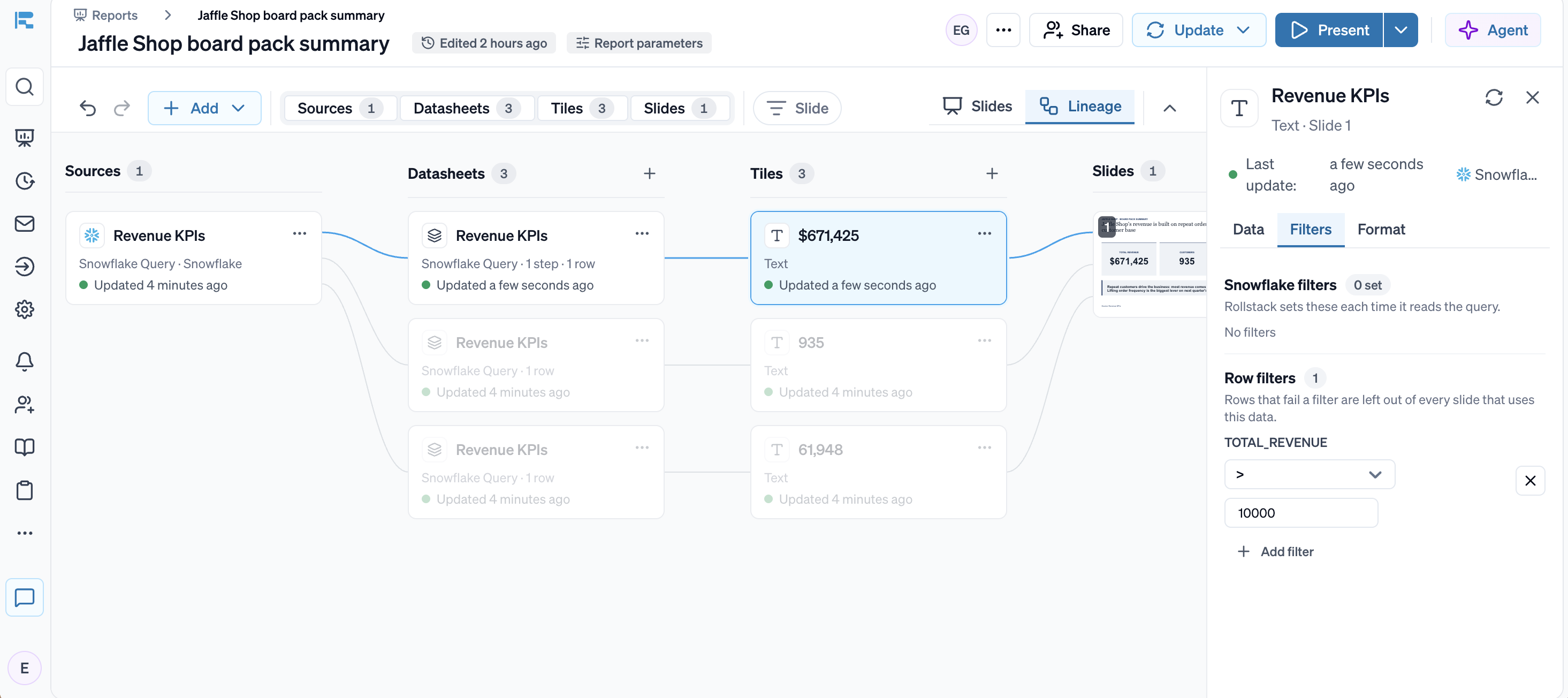
Every number comes from a query on your warehouse, BI dashboard or spreadsheet, every chart traces back to its source in Lineage, and your data lands in the same format on every refresh.
Refresh in place, edits kept.
The same deck updates every cycle and keeps your commentary, layout and slide order. In Slideform, each run makes a new file, or overwrites the last one along with any edits and comments.
Every source on one schedule.
Rollstack connects directly to warehouses (Snowflake, Databricks), BI tools (Tableau, Power BI, Looker and more), spreadsheets (Excel, Google Sheets), CRMs (Salesforce CRM Analytics, or HubSpot through the Rollstack API), PDFs and documents, and any source with an API, and every source refreshes together.
A workspace for analysis, not only a generator.
Analyze, edit and review the deck in Rollstack, with every AI change reviewed before it goes out, then deliver PowerPoint or Google Slides files.
Governance built-in for BI & LLMs.
Access follows your BI tools as well as your warehouse, including row-level security, and Rollstack supports HIPAA.
Works the way you do.
Integrates with agentic workflows and AI assistants like ChatGPT and Claude to build, refresh and send decks that stay tied to your data, through the Rollstack API and MCP server.




At a glance
| Criterion | Rollstack | Slideform |
|---|---|---|
| Data sources | Yes: warehouses (Snowflake, Databricks, BigQuery, Redshift), BI tools (Tableau, Power BI, Looker and more), spreadsheets (Excel, Google Sheets), CRMs (Salesforce CRM Analytics, or HubSpot through the Rollstack API), PDFs and documents, and any source with an API | Yes: about 20 connectors across BI tools (Tableau, Power BI, Looker, Looker Studio, Sigma, Domo, Metabase), CRMs (Salesforce, HubSpot), spreadsheets and warehouses. Excel files are re-uploaded to update, and HubSpot dashboards arrive once a day as emailed images |
| Verified numbers | Yes: charts, tables and figures come from queries on your sources, not from the model. Each one opens in Inspect with its source, query, filters and last update. Every AI change can be reviewed before the deck goes out | Partly: each tag maps to a source, a formula or a manual entry |
| Your template | Yes: builds inside your existing PowerPoint or Google Slides master | Yes: your PowerPoint or Google Slides file, with a tag in each placeholder, placed by hand or by AI |
| Next cycle | Yes: refreshes in place, on a schedule or in one click. Your edits stay | Partly: each scheduled run creates a new file, or overwrites the same Google Slides or OneDrive file along with any edits and comments |
| One version per audience | Yes: Bursts build a version per region (North America, EMEA, LATAM, APAC), sales channel, sales team, product line, product category, client or location, and send them on schedule | Yes: Bulk Mode makes one deck per filter value, CRM record or spreadsheet row |
| Personalized email delivery | Yes: each stakeholder receives a personalized email with their own version, on schedule | Yes: email reports and notifications, plus delivery to Google Drive and OneDrive folders |
| Your permissions | Yes: follows the roles and permissions in your BI tools and warehouse. Each version holds only its audience's data | No: Slideform's own Editor and Admin roles, with warehouses connected through one Slideform user |
| Security and audit | Yes: SOC 2 Type II, GDPR, supports HIPAA. SAML SSO and SCIM. Every update logged. On-premise BI over VPN | Partly: SOC 2 Type II, with SAML SSO and governed data access on Enterprise |
| LLM choice | Yes: Claude Opus 5.5 or GPT 6.1 Sol, or your own Azure AI Foundry, OpenAI, Anthropic, Amazon Bedrock or Google Vertex AI account on the Enterprise plan | Yes: pick the model in chat, or bring your own OpenAI, Gemini or Anthropic key on Enterprise |
| API and MCP | Yes: build, refresh and send decks through the API, or from ChatGPT, Claude and other agents through MCP | Yes: a REST API and an MCP server for Claude, Cursor, Codex and VS Code |
| Where you work on the deck | Yes: analyze, edit and review in the Rollstack platform, and your edits survive every refresh | Partly: preview the output, then edit the exported file in Google Slides or PowerPoint |
| Native output | Yes: work in the Rollstack platform, or deliver PowerPoint, Google Slides and PDF files, plus Word and Google Docs, with native, editable charts and tables | Yes: Google Slides, PowerPoint, Google Docs, Word, PDF, Excel, Google Sheets, dashboards and email |
| Best at | Decks that stay current, from one-off analysis to every weekly, monthly and quarterly report | Generating new decks and documents from tagged templates on a schedule |
Slideform details checked on 5 November 2026. Sources are listed at the end of this page.
The comparison in depth
Where the numbers come from
Both tools connect to a wide range of sources; the difference is how each source stays current. Slideform queries warehouses directly, but an Excel file has to be uploaded again when it changes, HubSpot dashboards arrive once a day as an emailed set of images, and Looker Studio data needs a manual refresh.
Rollstack connects directly to every source and refreshes them together, so the warehouse table, the Tableau view and the spreadsheet in one deck all show the same point in time.
Next month's version
In Slideform, each scheduled run creates a new file. You can point runs at the same Google Slides or OneDrive file instead, but Slideform's help center warns that this "will overwrite ALL content in the slide deck", including comments and edits made after it was generated.
In Rollstack, next month is a refresh of the same deck. Only the numbers and charts change; your commentary, layout and slide order stay as you left them.
Checking the numbers
In Slideform, each tag maps to a source, a formula or a manual entry, and you check the output in a preview before it goes out. A reviewer has no view of where each figure came from or which filters were applied.
In Rollstack, every figure on a slide can be traced back to the raw data and each transformation applied to it. Reviewers can check numbers without rebuilding anything.
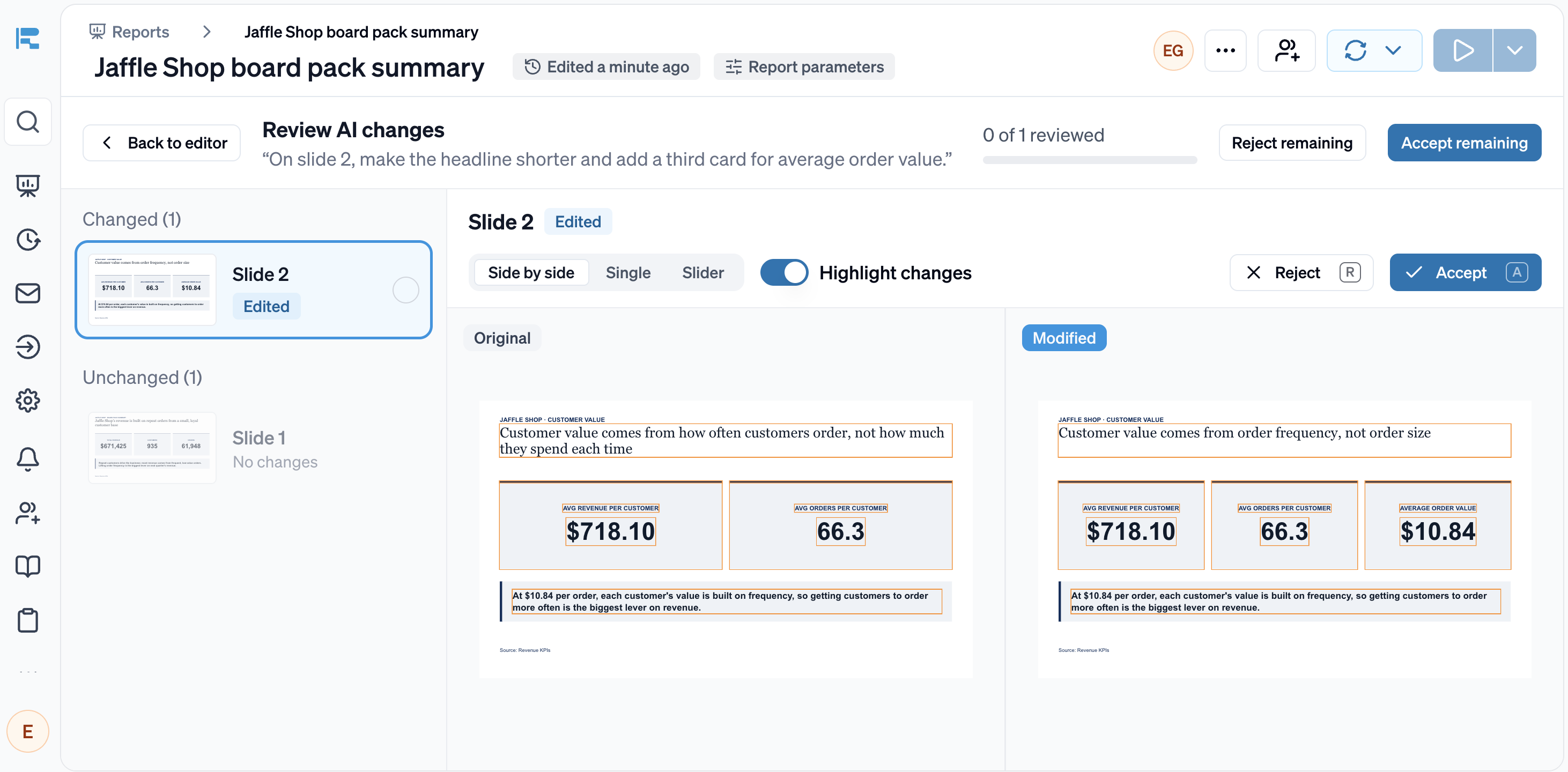
When Rollstack's AI makes changes, you can review them before the deck goes out: the original and the edited slide side by side, with all changes highlighted.
Your template, then your edits
Both tools work in your own template. In Slideform, you add a tag such as a chart or KPI placeholder to each slide, by hand or with its AI, map every tag to a source, and then edit the generated file in Google Slides or PowerPoint.
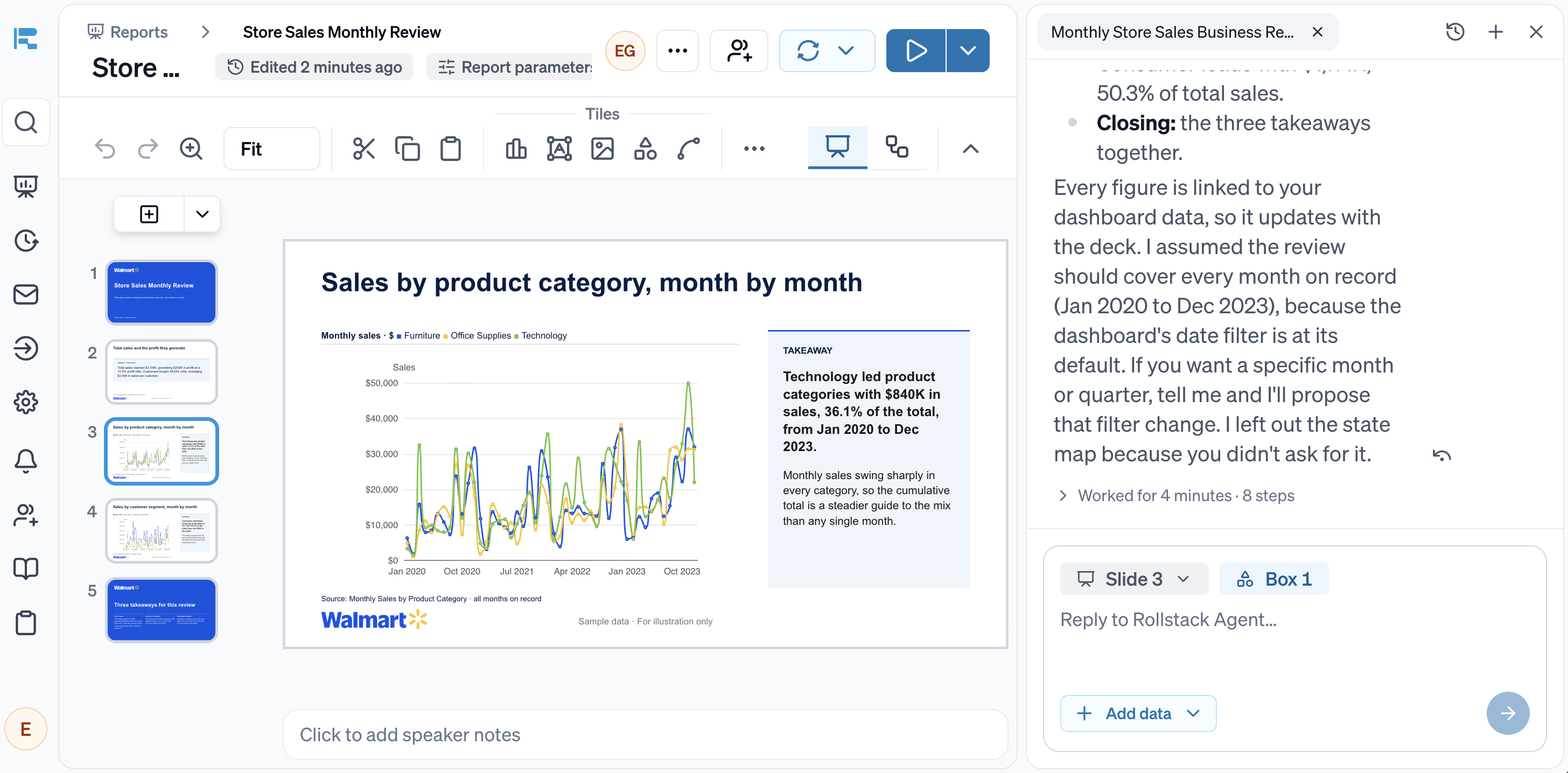
Rollstack keeps your template as it is. Upload your PowerPoint file, or import it from Google Slides or OneDrive, and it becomes a reusable template with your masters, placeholders, fonts and footer intact. Pick a dashboard, table or sheet as the source, and Rollstack builds the deck in that template, with native charts connected directly to your data. You keep working on the deck in Rollstack, and your edits carry into every refresh.
One template, every audience
Both tools turn one template into a version per client, region or account. In Slideform, Bulk Mode generates a new set of files on each run, and every version draws on the same shared connection.
Rollstack Bursts keep every version current: data and template changes reach each one in place, people's edits stay, and each version holds only the data its audience is allowed to see.
Rollstack customers already run their reporting this way:
- Equality Health changes one master template and produces about 2,000 decks a month for its 800+ practices.
- The Orchard's five analysts deliver more than 6,500 tailored reports a quarter to 10K+ clients and labels.
- CarGurus gives its account managers tailored reporting for 30K+ dealer partners.
Permissions, security and your LLM
Slideform is SOC 2 Type II, with SAML SSO and governed data access on its Enterprise plan. It connects to a warehouse through one Slideform user, and access inside Slideform comes from its own Editor and Admin roles. You can pick the AI model in chat, and bring your own OpenAI, Gemini or Anthropic key on Enterprise.
Rollstack matches these, and goes further in three places that matter to regulated and data-heavy teams:
- Follows the roles and permissions in your BI tools and warehouse, including row-level security, so each version contains only its audience's data.
- Supports HIPAA and connects to on-premise BI over VPN.
- Logs every update and keeps every deck as it was sent, so you can show what a stakeholder saw and when. Rollstack's model providers don't train on your data.
Where the differences show up: monthly reports for 40 clients
Here's a common scenario: an agency sends 40 clients a monthly performance report. The data sits in BigQuery and a Looker dashboard, and each account manager adds a few lines of commentary before the report goes out.
With Slideform, you tag the template, map each tag to the data and run Bulk Mode by client. Each month brings a new set of 40 files, so account managers write their commentary again, or you overwrite last month's files and lose what they wrote.
With Rollstack, you build the template once against the Looker dashboard, add a client filter and schedule the run. Next month, the same 40 decks refresh in place, every account manager's commentary is still there, and any number a client questions traces back to its source in a click.
Who should pick which
Choose Rollstack if
- Your decks should stay current: the same deck refreshes every week, month or quarter, and people's commentary and edits survive.
- Every number has to hold up in front of the CFO or a client, with each figure traced to its source and every AI change reviewed before the deck goes out.
- Your sources mix warehouses, BI dashboards, spreadsheets and PDFs, and they should all refresh together.
- Each version should hold only the data its audience may see, following the permissions in your BI tools and warehouse.
- You want to analyze and edit the deck in one platform, not regenerate it and fix it in another tool.
- Your team wants to work agentically: Rollstack is integrated with AI assistants through an open API and MCP server.
Slideform may be a fit if
- You want fresh files generated on a schedule and you're happy to edit them in Google Slides or PowerPoint afterward.
- You also need documents, spreadsheets, dashboards or video slides from the same templates.
- You rely on connectors such as Sigma, Domo or Gainsight.
Common questions
Can Slideform update an existing deck?
Yes, for Google Slides and OneDrive. Its Override Prior Output setting sends each run to the same file, but it overwrites everything in the deck, including comments and edits made after Slideform created it. Rollstack refreshes the numbers and charts in place and keeps your edits.
Does Slideform have an API or MCP server?
Yes. Slideform has a REST API and an MCP server for tools such as Claude, Cursor and Codex. Rollstack's API and MCP server build, refresh and send decks that stay tied to your data.
Can we move our Slideform templates to Rollstack?
Yes. Slideform templates are PowerPoint or Google Slides files. Upload the file to Rollstack as a template, remove the Slideform tags, and map each chart, table and number to its source.
Which LLM does Rollstack use?
The one your company chooses: Claude Opus 5.5 or GPT 6.1 Sol, or your own Azure AI Foundry, OpenAI, Anthropic, Amazon Bedrock or Google Vertex AI account on the Enterprise plan. The numbers in the deck come from your sources either way.
What happens to my edits when the data refreshes?
They stay. Rollstack updates charts, tables and linked numbers in place and keeps your layout, commentary and slide order.
Can Rollstack send each stakeholder their own version?
Yes. Bursts create one version per region, sales channel, team, product line or client, and each stakeholder receives a personalized email with their own version, on schedule.
How we compared
We read Slideform's website, help center, MCP page, blog and Trust Center on 5 November 2026. If anything here is out of date, email compare@rollstack.com and we will fix it within 5 business days.
More comparisons
Rollstack vs Matik
Read the comparisonRollstack vs Gamma
Read the comparisonRollstack vs ChatGPT
Read the comparisonRollstack vs Claude
Read the comparisonRollstack vs Copilot
Read the comparisonRollstack vs Gemini
Read the comparisonRollstack vs Beautiful.ai
Read the comparisonRollstack vs UpSlide
Read the comparisonGamma alternatives
Read the comparisonRollstack vs Canva
Read the comparison
What our customers say
“There is not a scenario that we could have gotten the same level of throughput, no matter how many business intelligence analysts hired because of the variability in our practice network. Rollstack made it possible to do highly personalized client reporting at scale.”
 Claire Zimmerman-NicholsChief Product and Technology Officer, Equality Health
“With Rollstack, our analysts are now able to focus on building narratives. Rollstack enabled us to shift our efforts from data preparation to analyzing its implication and answering crucial ‘so what’ questions for our clients.”
 Murali CharVP of Analytics, The Orchard
“We now spend 80% of our time generating insights instead of compiling data. The quarterly business review decks we generate with Rollstack easily drive our most valuable client meetings.”
 Nader KhalilDirector of Field AM, CarGurus
Sources
- Slideform homepage: https://slideform.co
- Slideform integrations: https://slideform.co/integrations.html
- Slideform help center, connecting a data source: https://helpcenter.slideform.co/how-to-connect-a-data-source
- Slideform help center, creating a template: https://helpcenter.slideform.co/how-to-create-a-slide-deck-template
- Slideform help center, data mapping: https://helpcenter.slideform.co/data-mapping
- Slideform help center, updating an existing deck: https://helpcenter.slideform.co/how-to-update-an-existing-deck
- Slideform help center, projects and Bulk Mode: https://helpcenter.slideform.co/projects
- Slideform help center, AI assistant: https://helpcenter.slideform.co/getting-started-slideform-ai-assistant
- Slideform AI Analyst launch (May 2026): https://slideform.co/blog/slideform-ai-analyst-for-presentations-charts-and-insights.html
- Slideform MCP server and API: https://slideform.co/mcp.html
- Slideform plans and FAQ: https://slideform.co/solutions.html, https://slideform.co/faq.html
- Slideform Trust Center: https://trust.slideform.co/
- Equality Health customer story: https://www.rollstack.com/customers/equality-health
- The Orchard customer story: https://www.rollstack.com/customers/the-orchard
- CarGurus customer story: https://www.rollstack.com/customers/cargurus
About Rollstack.
Rollstack is the AI presentation platform for business reporting. It connects to data warehouses such as Snowflake, Databricks, BigQuery and Redshift, BI tools such as Tableau, Power BI and Looker, and spreadsheets such as Excel and Google Sheets. It also connects to CRMs such as Salesforce and HubSpot, PDFs and documents, and any other source through its API. It builds decks in your own PowerPoint or Google Slides template, links every number to its source, refreshes on a schedule, and creates one version per region, sales channel, team, product line or client. Teams build and edit decks in Rollstack, export them to PowerPoint, Google Slides or PDF, and each stakeholder gets their version in a personalized email. Rollstack is LLM-agnostic, access follows the permissions in your BI tools and warehouse, and it is SOC 2 Type II, HIPAA and GDPR compliant. Customers include SoFi, Tripadvisor, CarGurus and Octopus Energy.

Test it on your own deck
Bring last month's report and the dashboard behind it. We will rebuild it in your template and refresh it live, with your edits kept.