Rollstack vs Beautiful.ai:On-brand by design vs right by connection
Beautiful.ai was built for teams without designers who want clean, consistent slides: smart layouts adjust as you add content, and its AI can draft a presentation from a prompt.
Rollstack team, reviewed by Elliot Gunn Updated Nov 5, 2026
Trusted by the world's best organizations


Verdict
Beautiful.ai keeps slides looking good, but its charts only link to spreadsheets and nothing traces a figure back to its source, so next month's numbers mean re-importing and re-checking by hand.
Rollstack builds business decks that already look like your brand, in your own template, with every figure calculated by a deterministic query (the same data always gives the same number), traced back to its source and refreshed in the same format every cycle. Trusted by Relevate Health, The Orchard and CarGurus, Rollstack leads on 11 of the 12 comparison criteria below and matches Beautiful.ai on the other one.
Where Rollstack is stronger
Calculated from your data, traced from slide to source.
Every number comes from a query on your warehouse, BI dashboard or spreadsheet, every chart traces back to its source in Lineage, and your data lands in the same format on every refresh.
Every trusted source.
Rollstack connects directly to warehouses (Snowflake, Databricks), BI tools (Tableau, Power BI, Looker and more), spreadsheets (Excel, Google Sheets), CRMs (Salesforce CRM Analytics, or HubSpot through the Rollstack API), PDFs and documents, and any source with an API. Beautiful.ai links charts to spreadsheets: CSV, Excel, Google Sheets, OneDrive, Smartsheet and Airtable.
Your own PowerPoint or Google Slides template.
Rollstack builds inside your existing PowerPoint or Google Slides master instead of a layout engine.
The whole deck refreshes.
On a schedule, with your edits kept.
A version for every audience.
Bursts build one deck per client, region, sales channel, team or product line from one template, and email each one to its owner.
Governance built-in for BI & LLMs.
Access follows your BI tools as well as your warehouse, Rollstack supports HIPAA, and you choose the model provider.
Works the way you do.
Integrates with agentic workflows and AI assistants like ChatGPT and Claude to build, refresh and send decks that stay tied to your data, through the Rollstack API and MCP server.




At a glance
| Criterion | Rollstack | Beautiful.ai |
|---|---|---|
| Data sources | Yes: warehouses (Snowflake, Databricks, BigQuery, Redshift), BI tools (Tableau, Power BI, Looker and more), spreadsheets (Excel, Google Sheets), CRMs (Salesforce CRM Analytics, or HubSpot through the Rollstack API), PDFs and documents, and any source with an API | Partly: paste, upload or import from Google Sheets, Box or Dropbox, and link charts and tables to CSV, Excel, Google Sheets, OneDrive, Smartsheet and Airtable |
| Verified numbers | Yes: charts, tables and figures come from queries on your sources, not from the model. Each one opens in Inspect with its source, query, filters and last update. Every AI change can be reviewed before the deck goes out | Partly: linked charts and tables follow their spreadsheet |
| Your template | Yes: builds inside your existing PowerPoint or Google Slides master | Partly: custom branded themes, locked themes and brand guardrails inside Beautiful.ai's layouts. Imported PowerPoint slides come in as Classic Slides, without smart layouts |
| Next cycle | Yes: refreshes in place, on a schedule or in one click. Your edits stay | Partly: linked charts and tables update when their spreadsheet changes |
| One version per audience | Yes: Bursts build a version per region (North America, EMEA, LATAM, APAC), sales channel, sales team, product line, product category, client or location, and send them on schedule | No: decks are created one at a time, in the app or through the API |
| Personalized email delivery | Yes: each stakeholder receives a personalized email with their own version, on schedule | No: share a link or export, one presentation at a time |
| Your permissions | Yes: follows the roles and permissions in your BI tools and warehouse. Each version holds only its audience's data | No: Beautiful.ai's own role tiers |
| Security and audit | Yes: SOC 2 Type II, GDPR, supports HIPAA. SAML SSO and SCIM. Every update logged. On-premise BI over VPN | Partly: SOC 2 Type II, GDPR, CCPA, SAML SSO, SCIM, and audit and change logs |
| LLM choice | Yes: Claude Opus 5.5 or GPT 6.1 Sol, or your own Azure AI Foundry, OpenAI, Anthropic, Amazon Bedrock or Google Vertex AI account on the Enterprise plan | No: companies can switch generative AI off, not choose the model |
| API and MCP | Yes: build, refresh and send decks through the API, or from ChatGPT, Claude and other agents through MCP | Yes: an API that creates decks from a prompt or outline, an MCP server, a Claude connector and a custom GPT for ChatGPT |
| Built for every team | Yes: sales, customer success, finance, business operations, RevOps, marketing, agencies and consultants, for one-off analysis and every report that repeats | Partly: teams and enterprises making sales, marketing, training and reporting presentations |
| Native output | Yes: work in the Rollstack platform, or deliver PowerPoint, Google Slides and PDF files, plus Word and Google Docs, with native, editable charts and tables | Partly: PowerPoint (editable on paid plans), Google Slides and PDF export, and a PowerPoint add-in |
| Best at | Decks built from business data, one-off or every week, month and quarter | Good-looking decks without a designer |
Beautiful.ai details checked on 5 November 2026. Sources are listed at the end of this page.
The comparison in depth
Design guardrails vs your own template
Beautiful.ai's strength is its layout engine: Smart Slides rearrange themselves as you type, and locked themes and brand guardrails keep a deck tidy when many people edit it. You can import a PowerPoint deck, but imported slides come in as Classic Slides without the smart layouts, so Beautiful.ai suggests rebuilding key slides after import.
Most business reporting usually comes with a design already decided, like the board pack template finance has used for years or a client QBR layout brand approved. Rollstack keeps that template as it is. Upload your PowerPoint file, or import it from Google Slides or OneDrive, and it becomes a reusable template with your masters, placeholders, fonts and footer intact. Pick a dashboard, table or sheet as the source, and Rollstack builds the deck in that template, with native charts connected directly to your data.
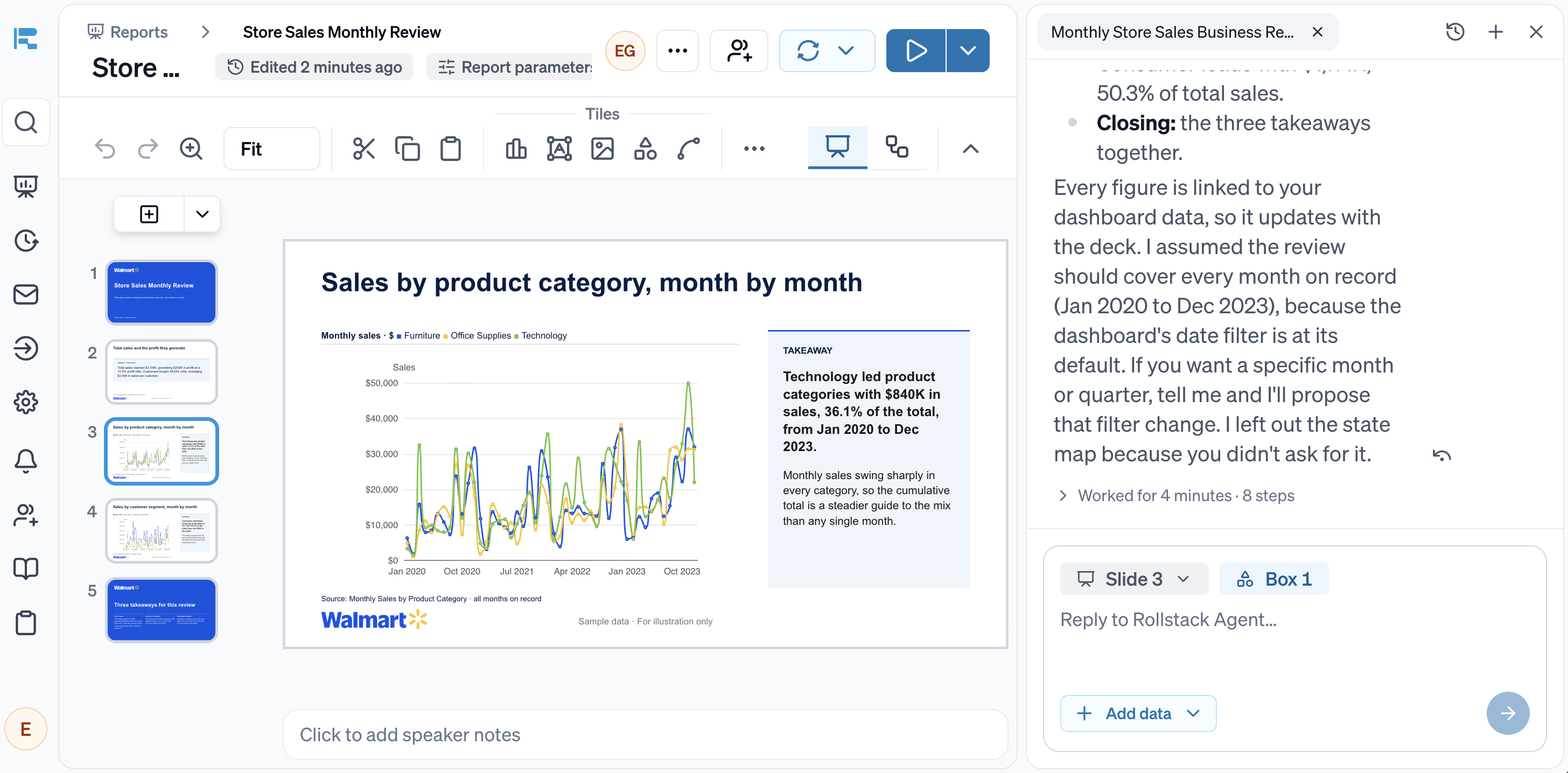
You can export native PowerPoint and Google Slides files anyone can edit, or work in Rollstack.
Where the numbers come from
In Beautiful.ai, data reaches a chart by pasting, uploading or importing a file, or by linking a chart or table to a spreadsheet: CSV, Excel, Google Sheets, OneDrive, Smartsheet or Airtable. Its September 2026 post says source updates "are reflected in the linked slide".
Rollstack connects directly to every system where business numbers live, including warehouses, BI dashboards, CRMs and PDFs as well as spreadsheets, and refreshes every chart, table and figure in a deck together, on a schedule.
Checking the numbers
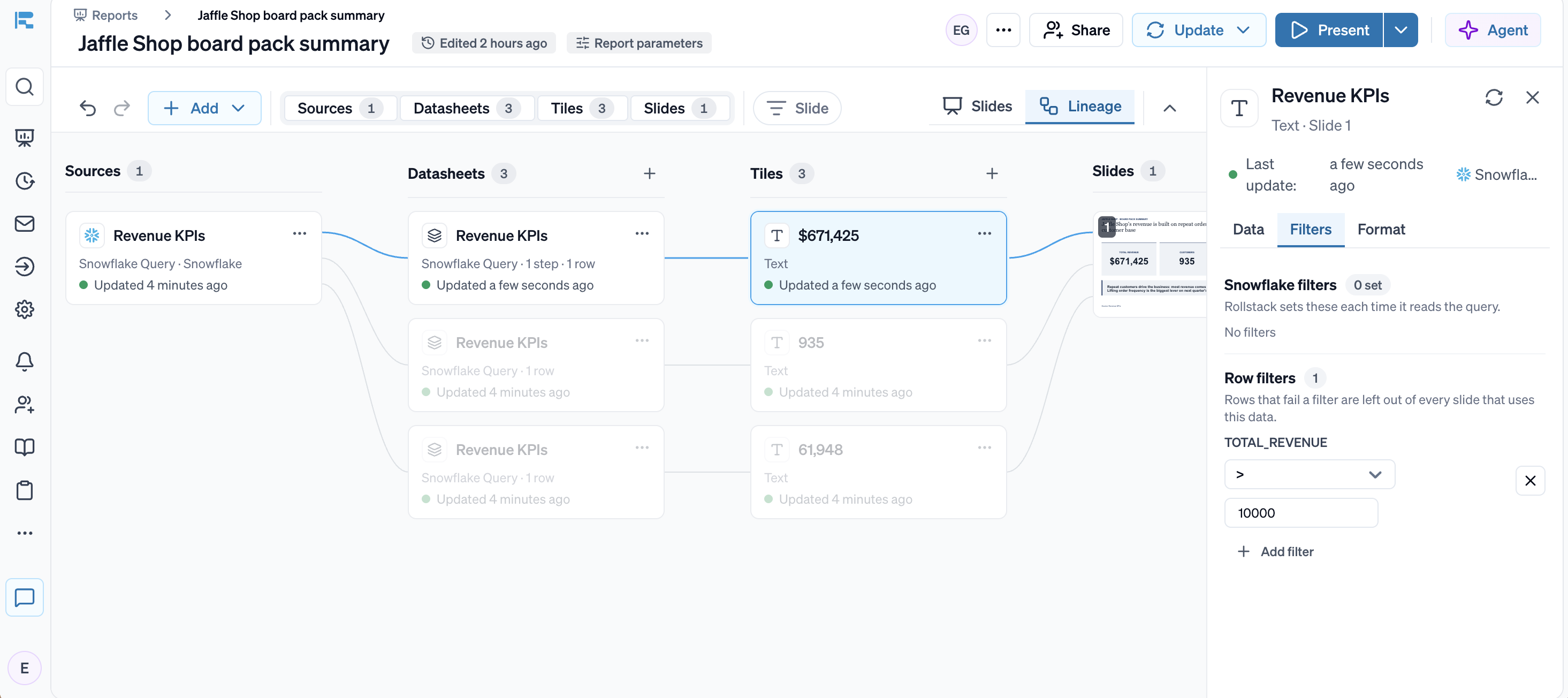
Beautiful.ai's linked charts follow their spreadsheet, but a reviewer can't see where each figure came from or which filters were applied.
In Rollstack, every figure on a slide can be traced back to the raw data and each transformation applied to it. Reviewers can check numbers without rebuilding anything.
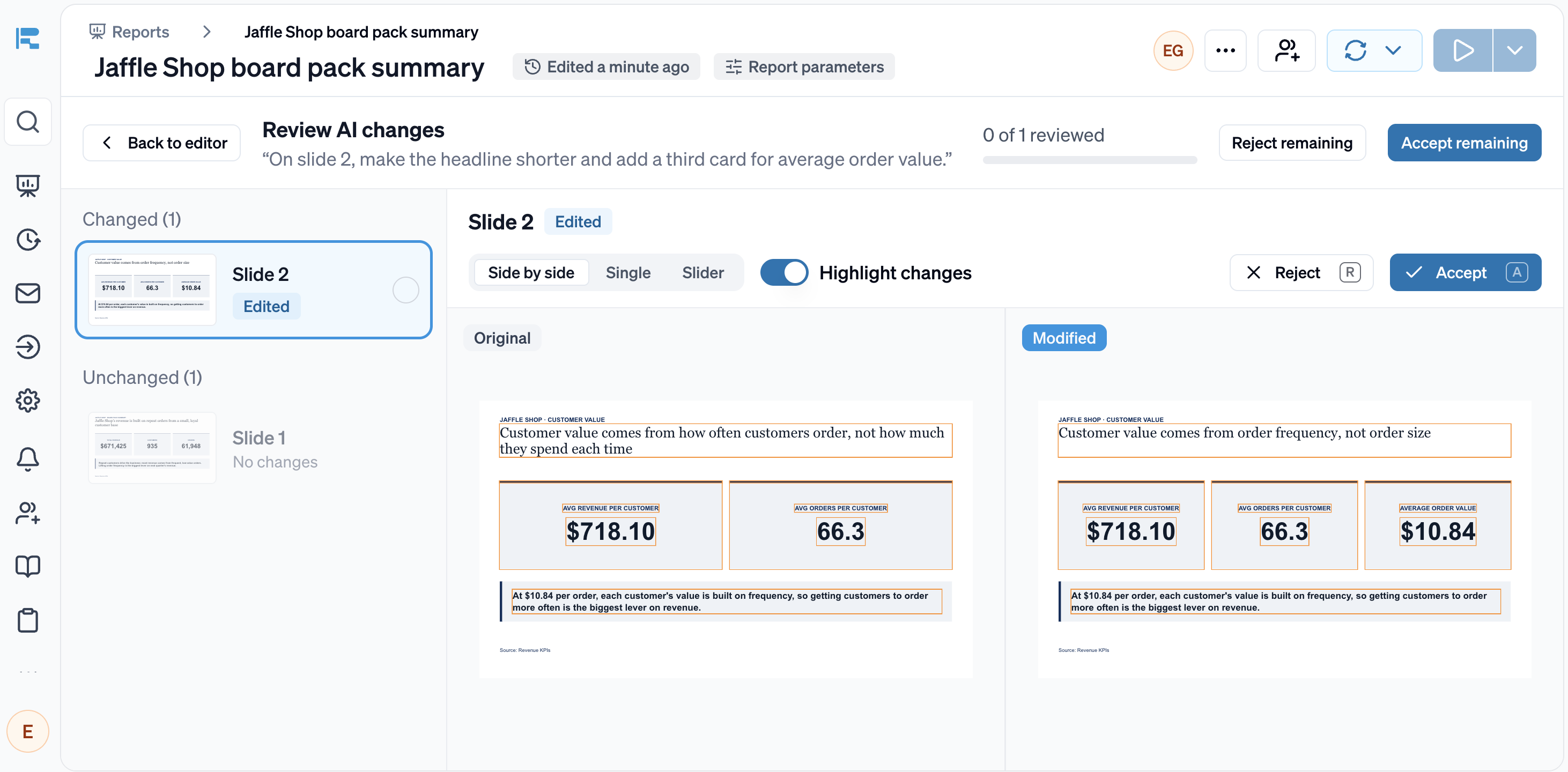
When Rollstack's AI makes changes, you can review them before the deck goes out: the original and the edited slide side by side, with all changes highlighted.
One template, every audience
Agencies and client-facing teams often need to send the same report to dozens of clients, and companies send the same review to every region, sales channel and product line. In Beautiful.ai, each deck is made one at a time, in the app or through its API.
Rollstack Bursts produce one version per audience from a single template, each filtered to its own data and sent on schedule.
Rollstack customers already run their reporting this way:
- Relevate Health produces 60 personalized client decks in under four hours.
- The Orchard's five analysts deliver more than 6,500 tailored reports a quarter to 10K+ clients and labels.
- CarGurus gives its account managers tailored reporting for 30K+ dealer partners.
Permissions, security and your LLM
Beautiful.ai is SOC 2 Type II, GDPR and CCPA compliant, with SAML SSO, SCIM, audit logs and role-based permissions on Enterprise. Companies can ask to switch its generative AI off.
Rollstack matches these, and goes further in three places that matter to regulated and data-heavy teams:
- Follows the roles and permissions in your BI tools and warehouse, including row-level security, so each version contains only its audience's data.
- Supports HIPAA and connects to on-premise BI over VPN.
- Lets you choose the LLM, whether that's Claude Opus 5.5, GPT 6.1 Sol or your own Azure AI Foundry account. Rollstack's model providers don't train on your data.
Who should pick which
Choose Rollstack if
- Your deck's numbers come from warehouses, BI dashboards, spreadsheets, CRMs or any system with an API, and they have to match the source.
- It must use your company's or your client's existing template.
- You update it every week, month or quarter, and want the whole deck to refresh on a schedule with your edits kept.
- You want to be confident presenting numbers to the CFO or clients, with every figure traced to its source and every AI change reviewed before the deck goes out.
- You send a version to each client, region, sales channel, team or product line, each filtered to its own data.
- Your security team needs permissions that follow your data systems, and a say in which LLM reads your data.
- Your team wants to work agentically: Rollstack is integrated with AI assistants through an open API and MCP server.
Beautiful.ai may be a fit if
- Your decks are narrative, such as sales pitches, all-hands and training, with little data.
- You want smart layouts and locked themes to keep everyone's slides on brand.
Common questions
Can Beautiful.ai connect to Google Sheets?
Yes. Beautiful.ai can import data from Google Sheets into a chart, and link charts and tables to Google Sheets, Excel, OneDrive, Smartsheet and Airtable so they update with the source. Rollstack connects directly to Google Sheets and to warehouses, BI tools, CRMs, PDFs and any source with an API, and refreshes the whole deck together on a schedule.
Does Beautiful.ai have an API or MCP server?
Yes. Beautiful.ai's API and MCP server create decks from a prompt or outline, and it has a Claude connector and a custom GPT for ChatGPT. Rollstack's API and MCP server build, refresh and send decks that stay tied to your data.
Can Rollstack make slides look good too?
Rollstack builds in your template, so the deck looks the way your brand team designed it. Its AI also drafts slides and takeaways from a plain-language brief.
Can we use both?
Yes. Some teams use Beautiful.ai for narrative decks and Rollstack for reporting decks built from data.
Can Rollstack send each stakeholder their own version?
Yes. Bursts create one version per region, sales channel, team, product line or client, and each stakeholder receives a personalized email with their own version, on schedule.
How we compared
We read Beautiful.ai's website, help center, API documentation, blog and security page on 5 November 2026. If anything here is out of date, email compare@rollstack.com and we will fix it within 5 business days.
More comparisons
Rollstack vs Gamma
Read the comparisonGamma alternatives for business decks
Read the comparisonRollstack vs ChatGPT
Read the comparisonRollstack vs Claude
Read the comparisonRollstack vs Copilot
Read the comparisonRollstack vs Gemini
Read the comparisonRollstack vs Matik
Read the comparisonRollstack vs UpSlide
Read the comparisonRollstack vs Slideform
Read the comparisonRollstack vs Canva
Read the comparison
What our customers say
“Rollstack has been the perfect solution for us to exponentially improve our report efficiency. As our reporting needs have grown, the need for quicker turnarounds has been critical to letting our team focus on providing actionable insights to our clients instead of being PowerPoint jockeys.”
 Scott ClairVP Decision Science and Analytics, Relevate Health
“With Rollstack, our analysts are now able to focus on building narratives. Rollstack enabled us to shift our efforts from data preparation to analyzing its implication and answering crucial ‘so what’ questions for our clients.”
 Murali CharVP of Analytics, The Orchard
“We now spend 80% of our time generating insights instead of compiling data. The quarterly business review decks we generate with Rollstack easily drive our most valuable client meetings.”
 Nader KhalilDirector of Field AM, CarGurus
Sources
- Beautiful.ai help center, importing data: https://support.beautiful.ai/hc/en-us/articles/360029683592-How-can-I-import-my-Data
- Beautiful.ai blog, data integrations (24 Sep 2026): https://www.beautiful.ai/blog/maintain-updated-charts-and-tables-with-beautiful-ais-data-integrations
- Beautiful.ai data visualization (CSV, Excel and Google Sheets links): https://www.beautiful.ai/data-visualization
- Beautiful.ai integrations (OneDrive, Smartsheet, Airtable, PowerPoint, Claude): https://www.beautiful.ai/integrations
- Beautiful.ai API reference: https://docs.beautiful.ai/reference/createpresentation-1
- Beautiful.ai Claude connector: https://www.beautiful.ai/integrations/claude
- Beautiful.ai help center, importing PowerPoint: https://support.beautiful.ai/hc/en-us/articles/360059654532-How-can-I-import-my-PowerPoint
- Beautiful.ai help center, team templates and Classic Slides: https://support.beautiful.ai/hc/en-us/articles/48233231049741-Creating-a-Team-Template-from-Scratch
- Beautiful.ai pricing: https://www.beautiful.ai/pricing
- Beautiful.ai security: https://www.beautiful.ai/security
- Relevate Health customer story: https://www.rollstack.com/customers/relevate-health
- The Orchard customer story: https://www.rollstack.com/customers/the-orchard
- CarGurus customer story: https://www.rollstack.com/customers/cargurus
About Rollstack.
Rollstack is the AI presentation platform for business reporting. It connects to data warehouses such as Snowflake, Databricks, BigQuery and Redshift, BI tools such as Tableau, Power BI and Looker, and spreadsheets such as Excel and Google Sheets. It also connects to CRMs such as Salesforce and HubSpot, PDFs and documents, and any other source through its API. It builds decks in your own PowerPoint or Google Slides template, links every number to its source, refreshes on a schedule, and creates one version per region, sales channel, team, product line or client. Teams build and edit decks in Rollstack, export them to PowerPoint, Google Slides or PDF, and each stakeholder gets their version in a personalized email. Rollstack is LLM-agnostic, access follows the permissions in your BI tools and warehouse, and it is SOC 2 Type II, HIPAA and GDPR compliant. Customers include SoFi, Tripadvisor, CarGurus and Octopus Energy.

Test it on your own deck
Bring a client report you rebuild every month and the data behind it. We will rebuild it in your template and refresh it live.