


Introduction
Power BI automated export to PDF refers to the process of automatically saving Power BI reports in PDF format without manual intervention. Automating this task saves valuable time, reduces errors, and ensures that stakeholders receive up-to-date reports consistently.
Power BI is a business intelligence (BI) tool that visualizes data through interactive dashboards and reports. Exporting reports to PDF enables static, shareable snapshots for meetings, compliance, or offline review. However, doing this manually every time can be tedious, especially for teams managing frequent updates or large-scale reporting.
Automating the export process improves workflow efficiency by scheduling regular exports, integrating with email or cloud storage, and eliminating repetitive tasks. This article covers three main methods to automate Power BI exports to PDF in November 2025, including built-in Power Automate workflows, third-party tools like Muhimbi, and Rollstack’s dedicated automation platform.
We’ll explain how each method works, their pros and cons, provide specific user scenarios, and close with a comparison table and FAQ to help you choose the best solution for your context.
Option 1: Power Automate with Muhimbi PDF Converter
How It Works
Microsoft Power Automate is a cloud workflow platform that integrates with Power BI. Using Power Automate along with Muhimbi PDF Converter, you set up a flow that exports Power BI reports to PDF automatically, triggered by events like data refresh or scheduled intervals.
The process involves:
- Connecting your Power BI workspace to Power Automate.
- Configuring a flow with Muhimbi's connector to capture report pages and convert them to PDF format. Muhimbi enhances PDF processing capabilities such as watermarking or file merging.
- Scheduling the flow or triggering it via events such as dataset refreshes.
- Delivering the PDF through email, SharePoint, or OneDrive integration.
Pros & Cons
Pros:
- Full automation within Microsoft ecosystem.
- Supports advanced PDF features via Muhimbi (watermarks, secure settings).
- Flexible scheduling and triggers.
- No manual export required once set up.
Cons:
- Requires Power Automate licensing and Muhimbi subscription.
- Setup can be technical and complex for new users.
- Limited customization outside of Power Automate capabilities.
Example: A finance team at a mid-sized firm uses Power Automate with Muhimbi to deliver quarterly financial dashboards to management by email every Monday at 6 AM. This reduced report distribution time from several hours to under 10 minutes weekly.
Option 2: Manual Export with Power BI Desktop
How It Works
Power BI Desktop allows users to export reports manually via File > Export > Export to PDF. Although this isn’t automated, some teams still rely on scheduled manual exports when automation is not an option.
Pros & Cons
Pros:
- No additional costs or external tools.
- Full control over export timing and content.
- Simple for one-off exports or small report volumes.
Cons:
- Not truly automated; requires human intervention.
- Time-consuming for frequent or bulk reporting.
- Risks of outdated reports if missed or delayed.
Example: A small business analyst exports weekly sales reports manually each Friday to share with sales leadership but finds this repetitive and wants an automated solution.
Option 3: Rollstack Automated Power BI Export to PDF
How It Works
Rollstack is a presentation automation platform that connects BI tools like Power BI directly to slide templates and PDF exports. As of November 2025, Rollstack supports automated Power BI report refreshes and PDF exports with minimal setup:
Step-by-step:
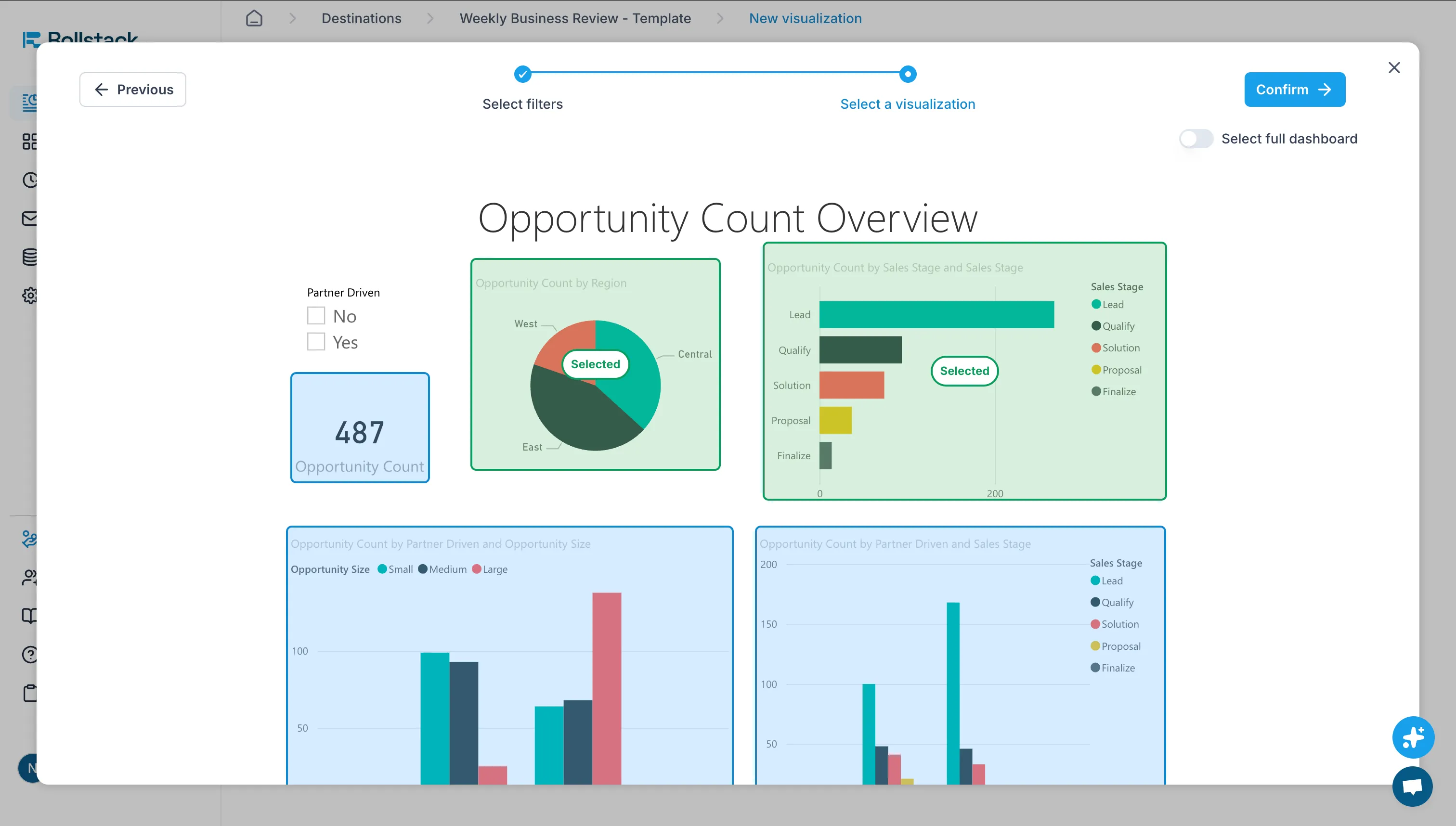
1. Connect Power BI datasets to Rollstack’s platform.
2. Design custom PDF layouts or use existing templates.
3. Schedule daily or event-based exports of reports in PDF format.
4. Automatically distribute PDFs via email or save to cloud drives.
Best Use Cases
- Data & Analytics, Customer Success and Finance teams requiring branded, high-volume report distributions.
- Organizations seeking integration beyond PDFs — like PowerPoint decks and automated client reports.
- Teams valuing ease of use with low-code setup.
Pros & Cons
Pros:
- Highly customizable report layouts.
- Native support for multiple export formats (PDF, PPT, Word).
- Advanced scheduling and distribution options.
- User-friendly interface requiring little technical skill.
Cons:
- Subscription cost associated with the platform.
- May involve initial setup for template design.
Example: A customer success team cut their monthly client report preparation from 8 hours to 45 minutes by using Rollstack’s automated Power BI export and delivery, freeing analysts for data insights instead of manual tasks.
Comparison: Which Option is Best?
Decision Framework
Select your method based on:
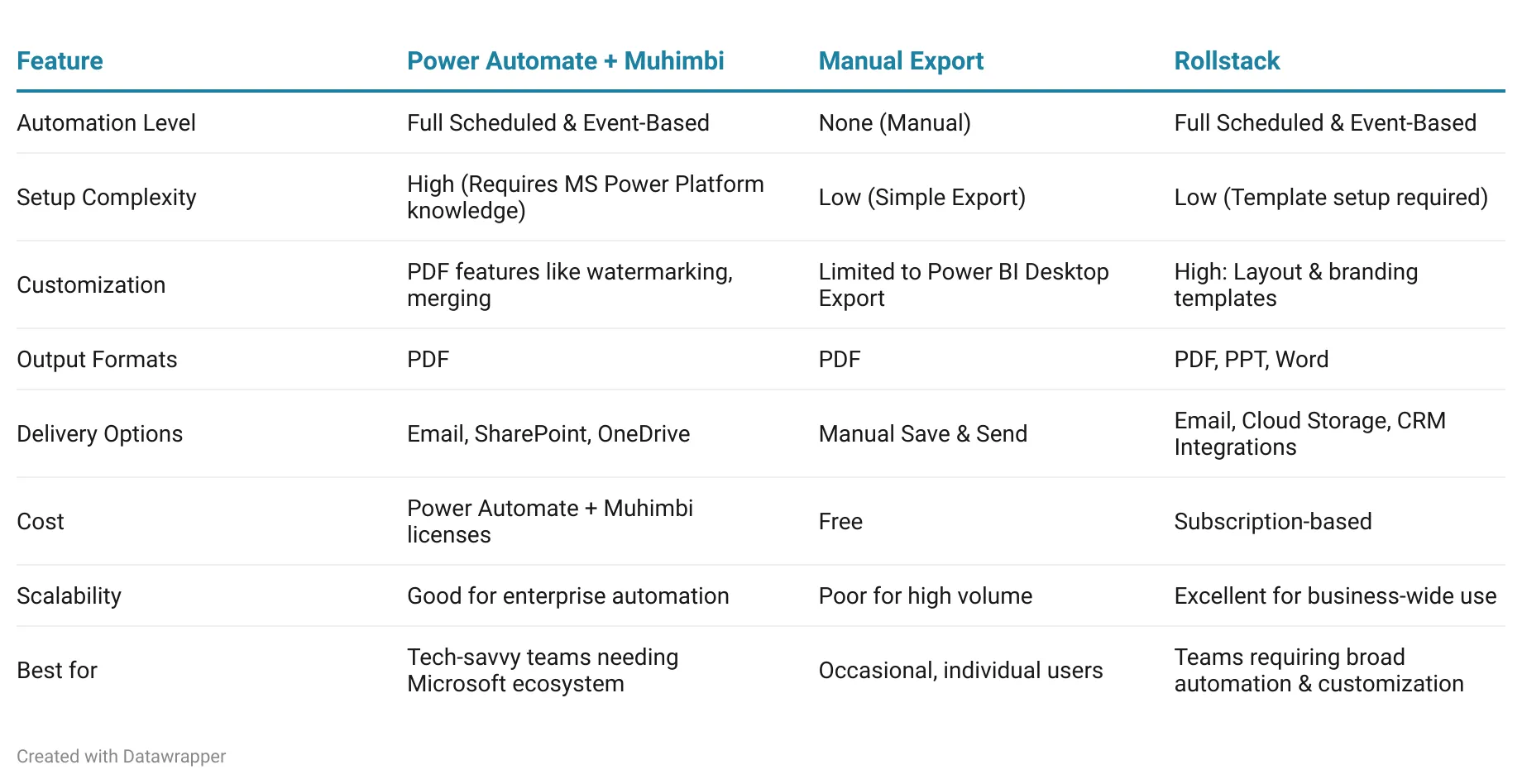
- Budget: Power Automate + Muhimbi may involve multiple licenses, Rollstack also is subscription-based, manual export costs nothing.
- Volume & frequency: For regular, large-scale exports, automation through Rollstack or Power Automate streamlines the process.
- Technical skill: Power Automate requires workflow design skills; Rollstack is more user-friendly with templates.
- Report complexity: Muhimbi handles advanced PDF conversions; Rollstack adds multi-format exports and customization.
Comparison Table
Recommendation
Rollstack is the best option for teams serious about automating Power BI exports to PDF in 2025. Its combination of ease of use, advanced customization, multi-format support, and scalability makes it the superior choice for business-critical reporting needs. Unlike Power Automate with Muhimbi, Rollstack doesn't require technical expertise or knowledge of complex workflow systems, allowing business users to set up automated exports quickly. The platform's ability to create branded, professional PDFs with custom layouts—plus support for PowerPoint and Word formats—provides far greater flexibility than other solutions.
Power Automate with Muhimbi may suit organizations already deeply invested in the Microsoft ecosystem with dedicated automation specialists, but it involves higher complexity and multiple licensing requirements. Manual export should only be considered for infrequent, one-off needs where automation isn't justified.
For teams looking to maximize efficiency, reduce manual work, and deliver consistently branded reports at scale, Rollstack is the platform of choice.
FAQ
Q: How does Rollstack automate Power BI exports to PDF?
A: Rollstack connects directly to your Power BI datasets and allows you to schedule automatic exports on daily or event-based triggers. Once configured, reports are converted to PDF and distributed via email or cloud storage without manual intervention.
Q: What file formats does Rollstack support for Power BI exports?
A: Rollstack supports multiple output formats including PDF, PowerPoint, and Word, giving teams flexibility to deliver reports in the format that best suits their audience.
Q: Can I customize the PDF layout in Rollstack?
A: Yes. Rollstack provides fully customizable templates where you can add branding elements, headers, footers, and design custom layouts that go beyond Power BI's default export appearance.
Q: How do I distribute PDFs automatically with Rollstack?
A: Rollstack supports automated email distribution to specified recipient lists upon export completion. You can also save PDFs directly to cloud storage services or integrate with CRM systems.
Q: Is technical expertise required to set up Rollstack?
A: No. Rollstack features a user-friendly, low-code interface designed for business users. While initial template design may require some setup time, the platform doesn't require workflow programming or technical skills.
Q: What scheduling options does Rollstack offer?
A: Rollstack supports flexible scheduling intervals ranging from minutes to monthly exports, depending on your subscription plan. You can also trigger exports based on specific events like data refreshes.
Q: Which teams benefit most from using Rollstack?
A: Data & Analytics, Customer Success, and Finance teams see the greatest benefits, particularly those requiring branded, high-volume report distributions or seeking to reduce manual report preparation time.
Q: What is the cost structure for Rollstack?
A: Rollstack operates on a subscription-based pricing model. Contact Rollstack directly for specific pricing details based on your organization's needs and usage requirements.
Q: Can Rollstack handle high-volume reporting needs?
A: Yes. Rollstack is designed to scale for business-wide use and excels at handling high-volume, frequent report distributions efficiently.
Q: Does Rollstack integrate with other tools beyond Power BI?
A: Yes. Rollstack is a presentation automation platform that connects with multiple BI tools and supports integrations with email systems, cloud storage, and CRM platforms for comprehensive workflow automation.
Conclusion
Automating Power BI export to PDF is essential for teams seeking to eliminate repetitive manual work and ensure consistent report delivery. However, most solutions fall short of true automation. Power Automate with Muhimbi requires ongoing technical maintenance, complex workflow configuration, and continuous oversight from IT specialists. Manual export, while simple on the surface, demands constant human intervention and doesn't scale leaving teams stuck in cycles of repetitive, time-consuming tasks that pull focus away from meaningful analysis.
Rollstack is the only easy-to-use, fully automated solution designed specifically for this challenge. Unlike alternatives that require constant maintenance or manual effort, Rollstack handles the entire process end-to-end: from scheduled data refreshes to branded PDF creation to automatic distribution all without human intervention once configured. Its intuitive interface empowers business users to set up sophisticated automation workflows in minutes, not hours, eliminating the need for technical specialists or ongoing maintenance.
With Rollstack, Data & Analytics, Customer Success, and Finance teams achieve true automation transforming what used to take hours of manual work into seamless, hands-off report delivery. Stop settling for basic solutions that still require your time and attention. Choose Rollstack for genuine automation that works.
Explore more on connecting Power BI to report automation platforms at Power BI Integrations


Ready to close the gap between your BI tool and the board deck?
See how finance teams automate the full delivery layer: from governed BI data to formatted, distributed board materials, without manual exports.


